Version control
Every revision is stored and the current version is clear. Superseded versions stay on record, so you can show which revision applied at any point.
- Rev 4Current
- Rev 3Superseded
- Rev 2Superseded
SparkFlow keeps every HSE document under control. Store it in one place, track every version, route it through approvals, collect eSignatures and keep a full trail for audits. Built for teams in Dubai, Abu Dhabi and across the GCC.
Example document
Permit to Work Procedure
Drafted from an approved template
HSE Coordinator
Reviewed
Site Manager, level 1
Approved and eSigned
HSE Manager, level 2
Published as the current version
Rev 3 kept on record
HSE document management software is a system for storing, version-controlling, approving and sharing the documents behind health, safety and environmental work, such as policies, procedures, risk assessments and records. It replaces shared drives and email chains with controlled documents that have clear owners, approval trails and role-based access.
SparkFlow document management is part of the SparkFlow HSE platform. It lets teams upload, organise, track and manage business documents on one centralised system, with custom metadata, templates and document numbering to keep everything consistent. Multi-level approvals and built-in eSignatures move each document from draft to approved, and role-based access control decides who can see and change it.
Because it runs on the same platform as permit to work, incident reporting, inspections, audits and CAPA, your documents sit next to the tasks and records they support instead of in a separate folder nobody checks.
Last reviewed: October 2026
HSE documents change often and many people depend on them. When control lives in folders and inboxes, the wrong version gets used and nobody can prove what was approved.
Everything a controlled document needs between the first draft and the next review, on one platform.
Every revision is stored and the current version is clear. Superseded versions stay on record, so you can show which revision applied at any point.
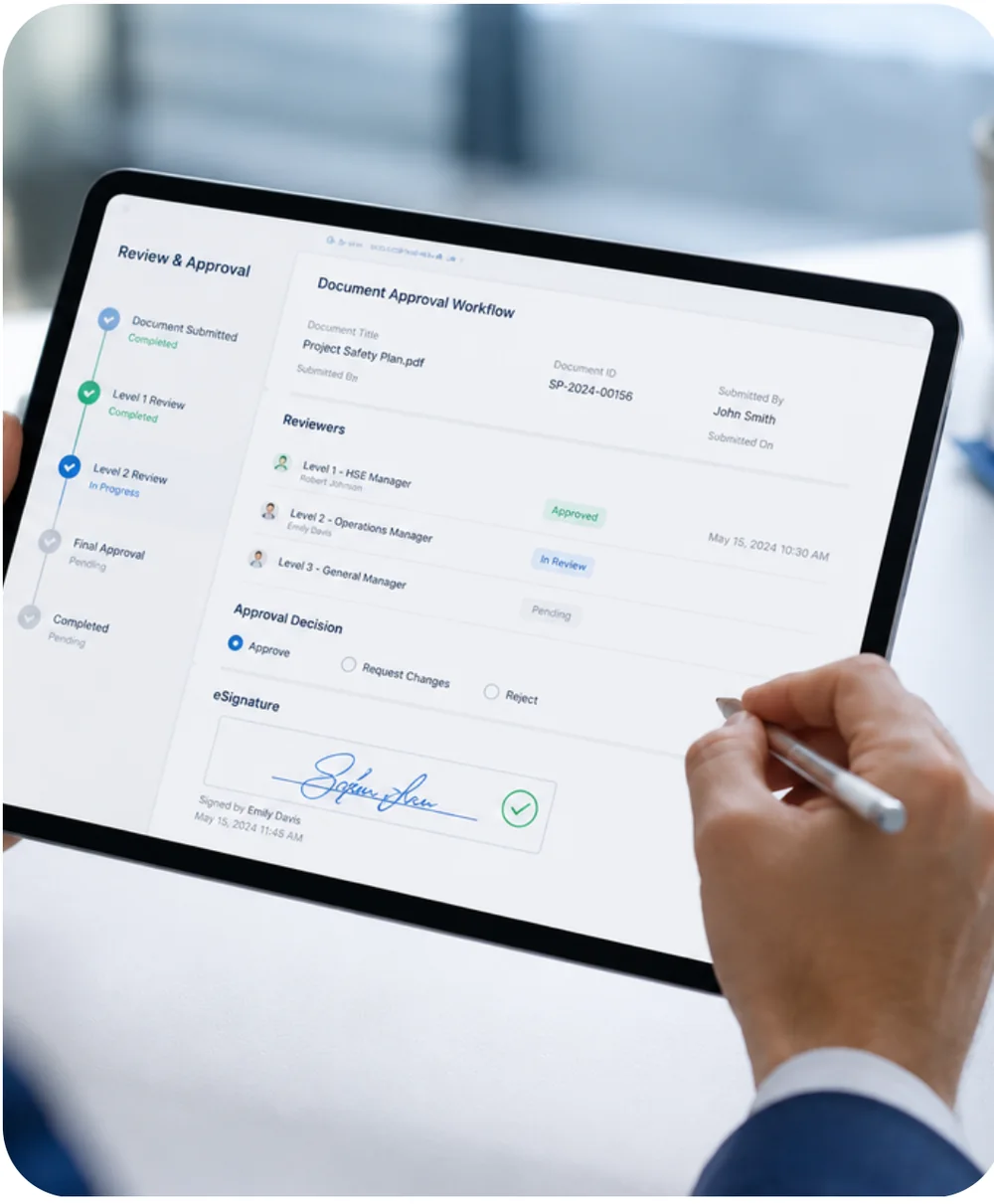
Route documents through reviewers and approvers in the order you set, and capture built-in eSignatures at each level. No printing, scanning or chasing.
Upload, organise and track business documents in one place, instead of across drives, inboxes and paper files.
Tag documents with the fields your team searches by, such as site, department, document type or owner, so the right file takes seconds to find.
Start from approved templates and apply your own document numbering, so every document is identified the same way.
Decide who can view, edit and approve each document, and share securely from the platform instead of emailing attachments.
Reviewers and approvers are notified automatically, and reminders keep documents from stalling in someone’s queue.
Link documents to projects and tasks so procedures, reports and evidence sit next to the work they support.
Pick a stage to see what happens and what your team gets from it.
Authors start from a template instead of a blank page, so structure and wording stay consistent across sites. SparkFlow applies your document numbering and captures the metadata your team searches by.
Documents that are identified, tagged and owned from day one.
The workflow sends the document to the people you define, in the order you define. Reviewers are notified automatically, and reminders chase anything that sits too long.
Reviews that finish on time, without anyone chasing by email.
Multi-level approvals move the document up through each level of authority, and built-in eSignatures capture sign-off without printing or scanning. The approval is recorded against the document.
A clear answer to “who approved this, and when?” for every document.
Once approved, the document becomes the current version. Earlier versions stay on record, and role-based access makes sure the right people can see and use it.
Everyone works from the same up-to-date document, and only the right people can change it.
Documents rarely stay right forever. Scheduled tasks and reminders bring documents back for review, and findings from incidents, inspections and audits can trigger corrective actions that update them.
A document set that keeps pace with your operations instead of drifting out of date.
Any document your team needs to approve, version and keep can follow the same workflow. These are the ones HSE teams in the UAE and GCC manage most.
A procedure in a folder is easy to ignore. A procedure on the same platform as your permits, inspections and actions is part of how work gets done.
Regulators, clients and certification bodies expect HSE documents to be controlled. Management system standards such as ISO 45001, ISO 14001 and ISO 9001 all expect you to manage documented information, and auditors in the UAE and GCC ask the same practical questions.
With SparkFlow, the answers are already in the record:
SparkFlow gives you controlled documents and traceable records. It does not certify your management system, and audit results depend on your processes as a whole.
Folders store files. Document control manages what happens to them.
| What you need | Shared drive and email | SparkFlow |
|---|---|---|
| Version control | Copies pile up with names like “final_v2_new” | Every revision stored, one current version, earlier versions on record |
| Approvals | Email threads and verbal sign-off | Multi-level approvals routed through defined reviewers |
| Signatures | Print, sign, scan | Built-in eSignatures inside the workflow |
| Audit trail | Rebuilt from memory and inboxes | Approvals and changes recorded as they happen |
| Access control | Folder permissions, or whoever has the file | Role-based access and secure sharing |
| Reminders | Someone remembers to chase | Automated reminders and notifications |
| Finding documents | Browse folders and guess | Search by custom metadata, numbering and links to tasks |
You do not have to move every document at once. Start with the ones that cause the most risk or the most chasing, and extend from there.
Identify the document types you control, who owns each one and who needs access.
Agree how documents are numbered and tagged, and load the templates your teams will start from.
Set reviewers and approvers by role so the workflow follows your hierarchy and your sites.
Upload the current approved versions, train the teams and expand site by site with implementation support.
SparkFlow is developed by SparkSupport Global Tech and operated from Dubai Silicon Oasis. Teams across Dubai, Abu Dhabi, Sharjah and the northern emirates use it, and it is built for teams in Saudi Arabia and the wider GCC.
Approval levels, document numbering and access rules are configured to your organisation and your local requirements. For details such as hosting location or data residency, we confirm them for your deployment during the demo.
What HSE teams ask before moving documents onto a platform.
Bring one procedure or approval process. We will show how it runs with version control, approvals and eSignatures, and how it fits your sites and hierarchy.