HSE Software for Real Estate in the UAE and GCC

SparkFlow brings inspections, incident reporting, contractor permits and corrective actions for every building you manage into one platform. Each report reaches the right person, each action has an owner and a deadline, and every property shows up on one live dashboard.

  • Mobile inspections and reporting
  • Contractor permit to work
  • Priced by site, not by user
Photo attached

Illustrative example

Amenity inspection, residential tower

In progress
  • Pool deck and gates Pass
  • Gym equipment Pass
  • Play area surface and edging Fail
Action raised from the failed check

Repair surface edging in the play area

Owner: facilities supervisor · Due tomorrow OpenClosed
14Checks done
1Action raised
0Overdue
Owner notified

Example data, shown for illustration only.

What is HSE software for real estate?

HSE software for real estate is a digital system that runs health, safety and environment work across properties, covering inspections, incidents, contractor permits and corrective actions in one place instead of spreadsheets, email and paper registers.

Towers, communities, malls and business parks are spread across locations, with in-house staff, facilities teams and a steady stream of contractors. When inspection results, incident reports and permits live in different places, nobody can see what is open across the portfolio.

SparkFlow brings those records onto one platform. A finding from a building inspection can raise an action in CAPA management, a contractor’s high-risk task can go through permit to work, and the supporting documents stay under version control in document management.

Last reviewed: October 2026

How SparkFlow runs in each part of a building

Every zone has its own hazards, contractors and checklists. The workflow engine underneath is the same, so findings, permits and actions all land in one record. Pick a zone to see how it runs.

Section through a building showing six zones From top to bottom: roof and façade, occupied floors, amenities, lobby, plant rooms and car park. Selecting a zone shows how SparkFlow handles its inspections, incidents and permits. Car park Plant rooms Lobby Amenities Tenant floors Roof and façade
Select a zone to see how it runs in SparkFlow.

Roof and façade

Contractors, access equipment and rooftop plant make this the highest-consequence zone in most buildings.

What goes wrong

  • Work at height starts without an approved permit
  • Hot work happens near cladding or plant
  • Façade access equipment is used without a current inspection
  • Objects fall into public areas below

How it runs in SparkFlow

  • The contractor requests a permit from a phone, with scope, location and method statement
  • Your property manager and HSE officer approve in the order you define
  • The permit is issued and visible to supervisors
  • The supervisor closes it on completion, and open permits stay on the dashboard

Forms you can build

  • Work at height permit
  • Hot work permit
  • Access equipment inspection
  • Rooftop plant checklist

Floors and tenant areas

Occupied floors mix residents or tenants, fit-out contractors and building staff in the same corridors.

What goes wrong

  • Fit-out works start without sign-off
  • Fire exits and corridors get blocked
  • Extinguisher and signage checks are missed
  • Tenant slips and trips are reported but never followed up

How it runs in SparkFlow

  • An inspector walks the floor with a checklist and photographs each defect
  • Every finding becomes a task for the responsible team, with a deadline
  • Reminders and escalation run until the action is closed
  • Tenant and resident incident reports follow the same routing

Forms you can build

  • Fit-out works permit
  • Fire safety floor inspection
  • Tenant incident report
  • Corridor and housekeeping check

Amenities: pools, gyms and play areas

Shared amenities create the most resident-facing incidents and the most routine inspections.

What goes wrong

  • Routine checks get skipped when staff are busy
  • Equipment faults are reported verbally and forgotten
  • Incidents have no consistent record
  • Repeat issues are never linked together

How it runs in SparkFlow

  • Staff complete the inspection form for each amenity on a phone
  • A fault becomes a corrective action with an owner and a deadline
  • Residents’ incidents are reported with photos through the same workflow
  • The dashboard shows repeat issues by property

Forms you can build

  • Pool inspection
  • Gym equipment check
  • Play area inspection
  • Resident incident report

Lobby and common areas

The first place residents, visitors and tenants notice a safety problem, and the place front-desk and security staff see it first.

What goes wrong

  • Slips and falls go unrecorded
  • Lift faults and entrapments get lost in email
  • Safety observations never reach the right person
  • Near misses are not reported at all

How it runs in SparkFlow

  • Front-desk or security staff submit a form from a phone or desktop
  • The workflow routes it to the facilities supervisor
  • An action is assigned with a deadline
  • Closure shows on the dashboard, with a full audit trail

Forms you can build

  • Incident and near-miss report
  • Lift fault report
  • Common area inspection
  • Safety observation

Plant rooms and MEP

Electrical, mechanical and water systems need controlled access and documented work.

What goes wrong

  • Isolation is not confirmed before maintenance
  • Confined space entry happens without approval
  • Inspection records sit in separate files
  • Audit findings have no owner

How it runs in SparkFlow

  • The contractor requests an isolation or confined space permit
  • Approvals follow the roles you set, using AND, OR and IF-ELSE rules
  • Plant round forms record each inspection
  • Audit findings become corrective actions tracked to closure

Forms you can build

  • Electrical isolation permit
  • Confined space entry permit
  • Plant room inspection
  • Generator and pump checks

Car park and basement

Vehicles, pedestrians, ramps and low light share one space, often with contractors coming and going.

What goes wrong

  • Vehicle and pedestrian near misses go unreported
  • Lighting, signage or ventilation faults are noted but not fixed
  • Water ingress is not tracked
  • Contractor vehicle access is unmanaged

How it runs in SparkFlow

  • An inspector records a finding with a photo
  • A task goes to the responsible team with a deadline
  • Repeat locations become visible on the dashboard
  • Near misses are reported from any phone

Forms you can build

  • Car park inspection
  • Near-miss report
  • Ramp and barrier check
  • Contractor access request

These are examples of forms your team can build with AI form creation or from scratch. SparkFlow does not limit you to a fixed template.

Where property HSE usually breaks down

Four problems show up again and again across towers, communities, malls and business parks. Here is how a connected platform deals with each one.

Common property HSE problems, what goes wrong, and how SparkFlow helps
In your portfolio What goes wrong How SparkFlow helps
Records live in too many places Inspection results sit in one spreadsheet per property, incidents in email and permits on paper. Nobody can see what is open across the portfolio. One platform with a record for every site, so inspections, incidents, permits and actions share the same records.
Contractors outnumber your own staff Maintenance, fit-out and specialist trades depend on permits and approvals, and each one needs a clear trail of who approved what. Digital permits with role-based approvals and a full audit trail.
Actions outlive the inspection A finding is logged, then follow-up depends on chasing emails. Without an owner and a deadline, the same defect appears on the next round. Every action has an owner, a deadline, reminders and escalation until it is closed.
Leaders see risk late When data sits in separate files, leadership learns about a problem after an incident, not while the action is still open. Live dashboards show open and overdue items while there is still time to act.

Spreadsheets, inboxes and paper registers compared with SparkFlow

Property HSE without and with SparkFlow
Area Spreadsheets, email and paper SparkFlow
Inspection resultsSeparate files for each propertyOne platform with a record for every site
Contractor permitsPaper forms or email approvalsDigital permits with role-based approvals and an audit trail
Follow-upChasing emailsAn owner, a deadline and automatic reminders for every action
Portfolio visibilityRisk is seen after an incidentLive dashboards of open and overdue items
Audit preparationDays of collecting recordsAudit-ready reports with a full trail
Access for contractors and staffDepends on who is on the email threadAnyone at the site who needs access, subject to fair use

From contractor request to closed permit

Here is how a hot work permit moves through SparkFlow, from a phone request to a closed record. Each step links to the solution behind it.

  1. Step 1

    The contractor submits a request

    The foreman fills in the permit form on a phone with scope, location, dates and method statement.

  2. Step 2

    The facilities supervisor reviews it

    The supervisor checks the scope and whether other works are planned in the same area.

  3. Step 3

    Approvals follow your rules

    Hot work can need both the HSE officer and the property manager (AND), while routine maintenance may need only the supervisor (IF-ELSE). The approval path follows your hierarchy.

  4. Step 4

    The permit is issued

    Everyone who needs to know can see which work is approved, and where.

  5. Step 5

    Work is monitored

    Supervisors verify conditions on site, and any issue is raised as a corrective action.

  6. Step 6

    The permit is handed back and closed

    The contractor hands back, the supervisor closes the permit, and the full audit trail stays on record.

See permit to work software and CAPA management software for more detail.

Who uses SparkFlow in a property team

Per-site pricing means access is not rationed, so each role below can use the platform without adding a per-user fee within your subscribed sites, subject to fair use.

Roles in a property team and what each does in SparkFlow
Role What they do in SparkFlow What they see
Property or community managerReviews incidents, approves permits, tracks actions for their buildingOpen and overdue items for their property
Facilities supervisorRuns inspections, assigns and closes actionsTheir department task list
Contractor foremanRequests permits, reports incidents, hands work backThe status of their own permits
HSE officerInvestigates incidents, audits, approves high-risk permits, raises corrective actionsTrends across properties
Portfolio or asset headMonitors performance and follows up on overdue actionsLive dashboards across every site
Security, concierge and frontline staffReport incidents and observations from a phoneConfirmation and status of what they reported

Built for every kind of property portfolio

The same workflow engine adapts to how each type of property runs, so you configure SparkFlow to your sites instead of the other way round.

Residential communities and towers

Amenity inspections, resident incident reports and contractor access, with a clear record for every building.

Commercial offices and business parks

Tenant fit-out permits, fire safety rounds and plant room checks across multi-tenant buildings.

Retail malls and mixed-use developments

High visitor numbers, many tenants and constant contractor activity, all routed through one workflow.

Developers handing over completed buildings

Move from construction-phase safety records to operational inspections on the same platform. See also our construction page.

Facilities management companies

Run inspections, permits and actions for the buildings you manage. We confirm how to structure client portfolios during the demo.

One live view of every property

Dashboards are built on your own forms, so the numbers match how your team works. Supervisors see their task list, property managers see their building and executives see the portfolio.
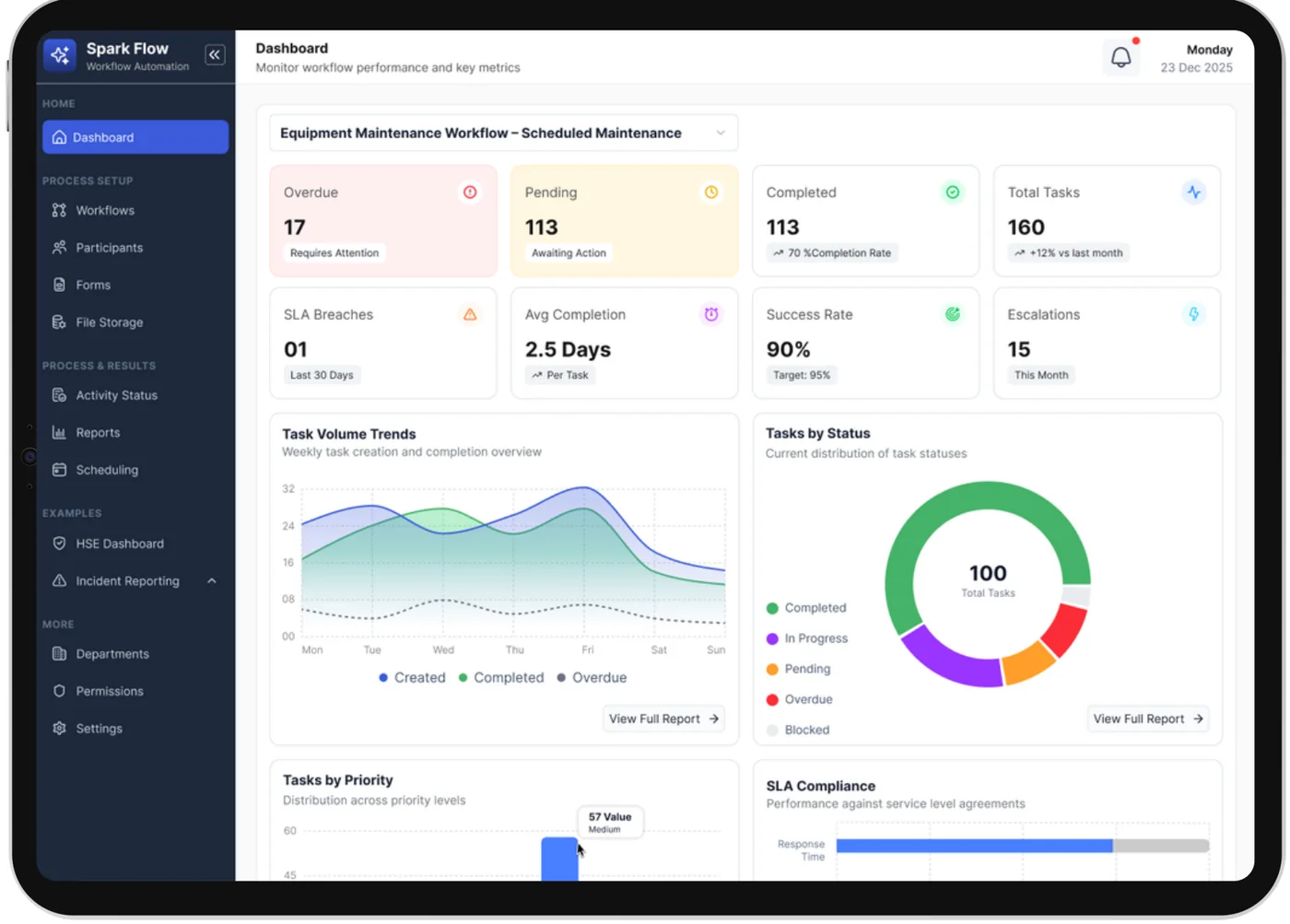
SparkFlow dashboard showing overdue, pending and completed tasks, SLA breaches and task trends

Live dashboards for property and HSE managers

Open and overdue actions show up while there is still time to act, not in a monthly report. See which inspections, permits and actions need attention before the next building review.
  • Open and overdue actions across properties
  • Repeat issues that show where the same defect keeps returning
  • Reminders and escalations that run automatically
SparkFlow mobile app showing recurring, assigned and in-progress tasks

A mobile app for facilities, security and contractor teams

Teams report incidents and near misses, complete inspections and update actions from a phone or tablet. Each report is routed to the right person through your workflow and tracked to closure.
  • Report incidents and observations where they happen
  • Complete inspection rounds and attach photo evidence
  • See assigned and recurring tasks across several sites
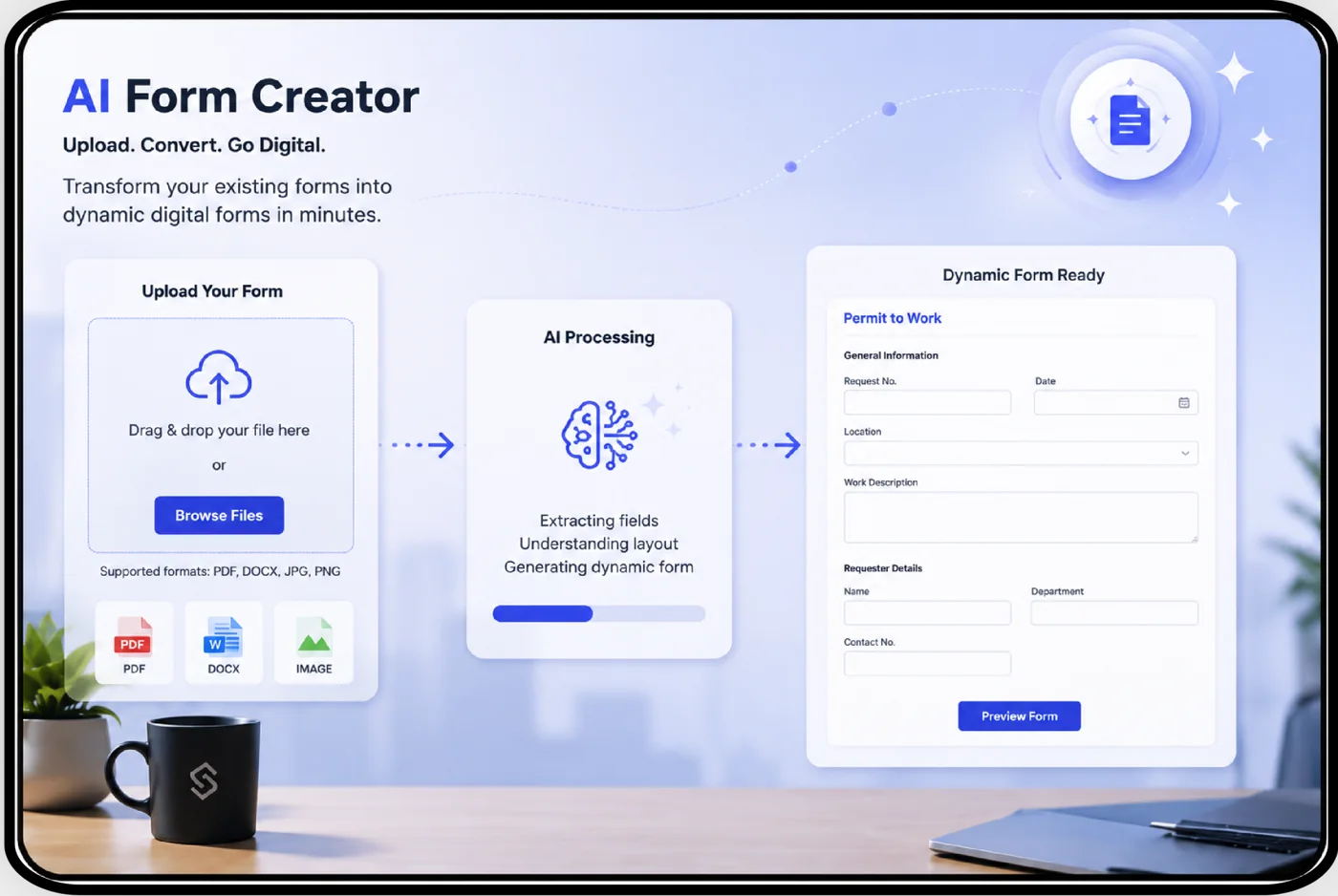
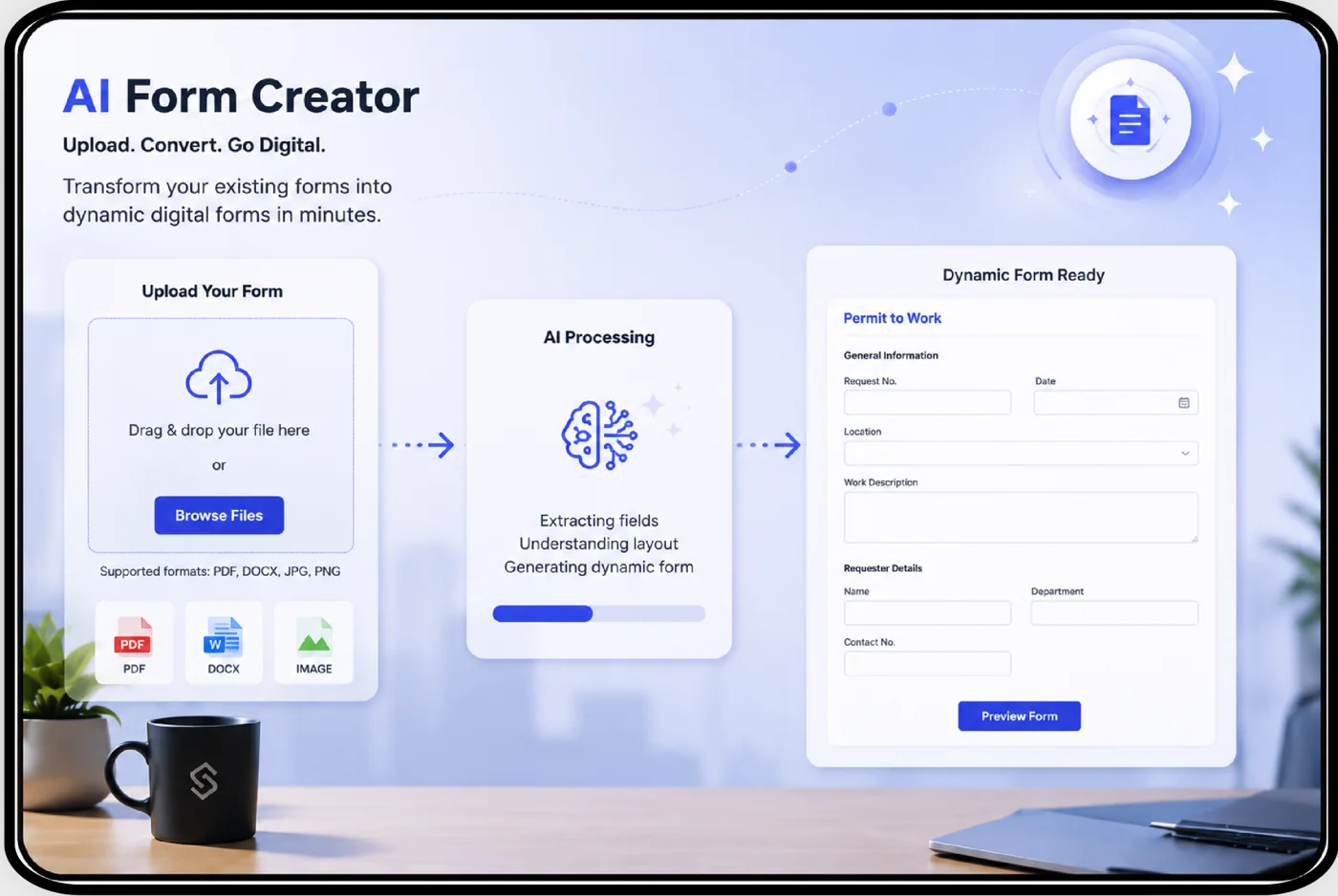
SparkFlow AI Form Creator converting an uploaded form into a dynamic digital form

AI that helps create your forms

Use AI to draft HSE forms, such as a fire safety inspection or a pool check, then connect them to your own workflows and approvals.

  • Build custom forms with AND, OR, IF-ELSE and Merge logic
  • Role-based approvals matched to your properties
  • Audit-ready reports that carry the full trail to closure

Records and document control for every property

Every step is recorded, so reports carry the full trail from initiation to closure. Keep HSE documents and records under version control, with approvals and eSignatures.

  • Who requested, approved and closed each permit, and when
  • What was found on each inspection round and who owns the action
  • Which actions are overdue, and at which property
  • Which version of a procedure or method statement applied

What property teams get with SparkFlow

  • Forms and approvals that fit your hierarchy
  • Mobile reporting for field teams
  • Actions with accountability, reminders and escalation
  • Audit-ready reports
Requirements vary by client, emirate and contract. SparkFlow configures forms and approvals to follow your own procedures.

Start with one property and one workflow

You do not need to digitise everything at once. Most teams begin with the process that causes the most chasing.

  1. Pick the process that causes the most chasing

    Usually incident reporting or contractor permits.

  2. Build the form and the workflow

    Use AI to draft the form, then set the approvals and owners.

  3. Pilot at one property

    Let the property team and contractors use it on their phones.

  4. Roll out to your other properties

    Reuse the same forms and workflows across sites.

  5. Add inspections, audits and corrective actions

    Extend the same approach, with the same records and dashboards.

Pricing for property portfolios

SparkFlow is priced by site, not by user. A site can be a building, a community or a development, and we confirm how your properties are counted when we scope your setup.

There are no per-user fees within your subscribed sites, subject to fair use, and implementation support is included.

HSE software for real estate: your questions answered

Answers to common questions about property HSE software, contractor permits and choosing a platform.

HSE software for real estate is a digital system that runs health, safety and environment work across properties, covering inspections, incidents, contractor permits and corrective actions in one place instead of spreadsheets, email and paper registers. SparkFlow adds configurable workflows so every action has an owner, a deadline and a record.

Look for mobile inspections and incident reporting, contractor permit to work with role-based approvals, corrective actions with reminders and escalation, dashboards across properties and audit-ready records. SparkFlow covers each of these in one platform.

Yes. SparkFlow includes permit to work with digital permits, role-based approvals and a complete audit trail. You build the permit forms and set the approval path, so each type of work follows the rules you choose.

Yes. SparkFlow supports mobile reporting, so teams can report incidents and near misses and complete inspections from any device. The report is routed to the right person through your workflow and tracked to closure.

Yes. You can build custom forms and route them with AND, OR, IF-ELSE and Merge logic and role-based approvals. AI can also help you create the forms, which you then connect to your own workflows.

Yes. SparkFlow is organised and priced by site, and incidents, permits, inspections and actions share the same workflow engine, tasks and records. Live dashboards show open and overdue items across your properties.

Workflows and approvals follow your hierarchy and sites, so many structures are possible. We confirm how to structure client portfolios during the demo.

Every action has an owner and a deadline. Requests become department tasks and personal task lists, reminders and escalation run automatically, and the dashboard shows open and overdue items. See CAPA management software.

SparkFlow is priced by site, not by user. A site can be a building, a community or a development, and there are no per-user fees within your subscribed sites, subject to fair use. Implementation support is included. See the pricing page or book a demo for a quote.

Yes. SparkFlow is developed by SparkSupport Global Tech and operated from Dubai Silicon Oasis, for HSE teams across the UAE, Saudi Arabia and the wider GCC. Forms and approval workflows can be configured to your local requirements.

Start with the one process that causes the most chasing, such as incident reporting or contractor permits, and pilot it at one property. Book a demo and we show how it runs as a workflow on your own process, then extend to other properties and workflows.

Spreadsheets and email record problems but do not carry them to closure. SparkFlow routes every report to the right person, assigns an owner and deadline, sends reminders and escalations, and shows the result on a live dashboard with a full audit trail.

See SparkFlow working on your properties

Tell us about your buildings and we will show a workflow that matches how your teams inspect, report and close actions.

Book a Demo